

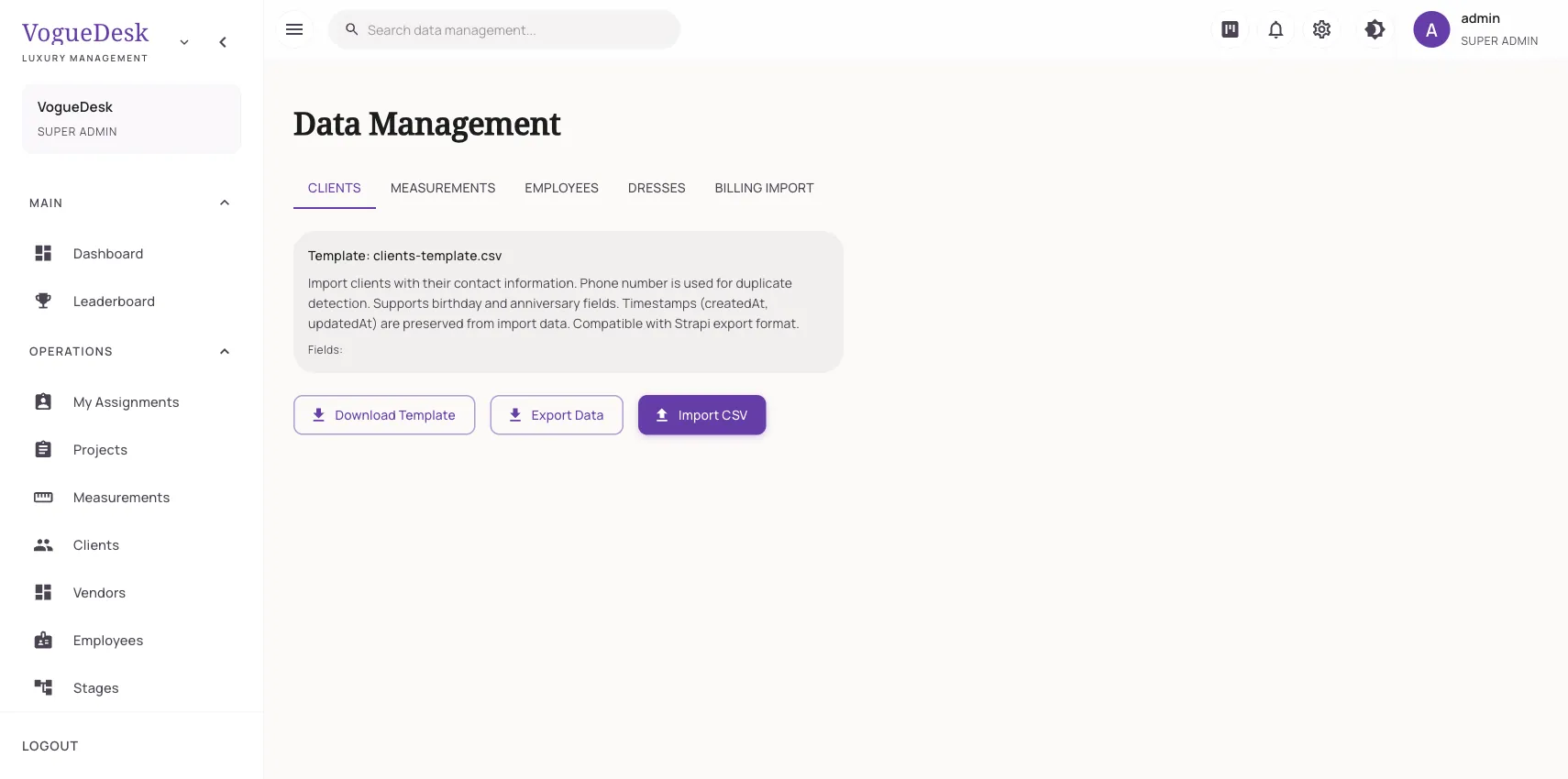
Switching is easier when your history comes along
The biggest worry about moving to new software is the old data: years of client numbers, measurements in a spreadsheet, invoices in Tally. Nobody has time to type that again in the middle of the wedding season. Importing from Tally and Excel means you start VogueDesk with your clients, measurements and bills already in place.
What you can import, and from where
| Source | File | What comes in |
|---|---|---|
| TallyPrime | XML export | Clients, vendors, invoices, payments |
| Zoho Books | Backup ZIP or CSV | Clients, vendors, invoices, payments |
| Odoo | CSV | Clients, vendors, invoices, payments |
| Spreadsheets (Excel, Google Sheets) | CSV using VogueDesk’s templates | Clients, measurements, employees, garments, invoices, vendors, payments |
Excel files need to be saved as CSV before upload. Each data type has a downloadable template showing the expected columns.
Measurements get extra care
Measurement sheets are the messiest data in any boutique. One person wrote “Chest”, another “Bust”, someone used “Shldr”. The measurement import is built for this:
- Upload your CSV.
- The import analyser reads the column headings and suggests the VogueDesk field for each.
- A review screen shows which rows match existing clients and where a new set clashes with one already saved.
- You resolve those, then commit. Nothing is saved until you do.
VogueDesk’s measurement fields are a fixed list of about 30, so any column that does not fit can go into notes. See the tailor measurement app for the full list.
Billing imports with control
When importing from Tally, Zoho or Odoo, you choose:
- Which data to bring in: clients, vendors, invoices, payments, or a mix.
- What to do with duplicates: update the existing record, or skip it.
- Whether to create orders from invoices, and only for invoices after a chosen date.
After the import you get a summary for each type showing how many rows were created, updated or had errors. There is also a clean-up tool for duplicate clients, which old records often contain.
How it works in VogueDesk
- Open data management as an admin.
- Pick the source, such as Tally, Zoho, Odoo or a template.
- Export the file from your old system, or fill the template.
- Upload, choose your options and run the import.
- Check the summary and fix any rows with errors.
Before you import
A little cleaning saves time later. Remove blank rows and test entries, keep one phone number per client in its own column, and make sure dates use the same format throughout. Start with a small file of a few clients to see how the columns map, then import the rest. If duplicates still slip through, run the duplicate clients clean-up after the import.
Who it is for
- Boutiques moving from Tally who want production tracking alongside accounts.
- Shops running on Excel or Google Sheets that have outgrown them.
- Boutiques with years of measurements they cannot afford to lose.
If you are comparing options, read VogueDesk vs Excel and VogueDesk and Tally. For ongoing sync rather than a one-time move, see the Zoho Books integration. Plans are on the pricing page.
Frequently asked questions
Can I upload an .xlsx Excel file directly?
Save the sheet as CSV first (File, Save As, CSV in Excel or Google Sheets), then upload the CSV. VogueDesk gives you templates with the right column headings.
What can I bring in from Tally?
Upload a TallyPrime XML export and VogueDesk imports clients, vendors, invoices and payments. You choose which of these to bring in.
What happens if a client already exists?
You choose. VogueDesk can update the existing record with the imported details, or skip it and keep what is already there.
My measurement sheet has different column names. Will it work?
Yes. The measurement import analyser reads your columns and suggests which VogueDesk field each one matches. A review screen lets you sort out client matches and clashing measurements before anything is saved.
Can I turn old invoices into orders?
Yes. When importing invoices, you can ask VogueDesk to create orders from them, and limit this to invoices after a date so old completed work does not clutter your list.
Can I get my data out again?
Yes. Admins can export each kind of data, such as clients, measurements, employees, invoices, vendors and payments, as a CSV file.
Last updated 31 October 2026.